Orchestra Parameter Sender
Description
The Orchestra Parameter Sender is used to send data over a direct point to point connection between two Orchestra nodes. The values must be received by an Orchestra Parameter Receiver.
You can define parameters to which you must assign values when calling the channel. These values are then serialized and sent over the connection.
On the receiver side a Parameter receiver channel is used to receive the data. If working in synchronous mode, the receiver will return one or more values to the sender.
The inbound channel implements a idempotent behavior. This means, the receiver can determine if the current request is sent repeatedly. When it detects such a repetition the request is skipped and ignored. The sender then receives an already-executed result. The sender defines if idempotent communication shall be used or not. When the channel is invoked by a process activity, just set the parameter IDEMPOTENT to true or false.
Creation
To create an Orchestra Parameter Sender, follow the steps described in the general description of Channels.
Configuration
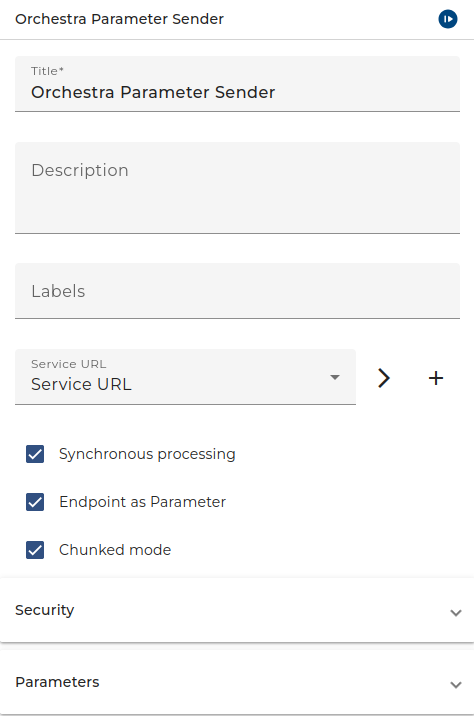
The dialog to configure the Orchestra Parameter Sender looks like:
 |
|---|
| Base view of the channel Orchestra Parameter Sender |
-
Synchronous processing Set this checkbox to true if you want to wait until the data was received and you got the values of the return parameters.
-
Service URL Choose an Environment Entry of type Uniform resource locator which points to the remote Orchestra. It contains the URL to call if Static endpoint is selected. If in the Environment entry a Proxy server is defined it is used even if Dynamic endpoint is selected.
-
Endpoint as Parameter If this checkbox is selected, the channel has a parameter ctrl_endpoint. The caller has to provide the actual URL as value of this parameter. In this case the URL defined in the Service-URL is not used; If a Proxy server is defined in the Service-URL this proxy is used even if Endpoint as Parameter is not selected.
-
Read Timeout If after this time the receiver returns no data (in synchronous mode) an error occurs.
-
Chunked mode In case of large messages the transfer encoding chunked will reduce memory consumption because Orchestra need not serialize the message completely in memory before sending it over the HTTP connection.
-
Security -> Authentication Here you may select an authentication type. You can select one of:
- No authorization required,
- Username/Password,
- Use preemptive authorization (Username/Password),
- Use certificate authorization
- or Use OAuth2.0 authentication. If you selected Use certificate authorization then the selected user credential must have a PKCS#12 Key Pair. See Credentials for more information about user credentials, and key pairs. See also the best practice story Web Service Security in SOAP web service calls for more information about how to import a Key Pair.
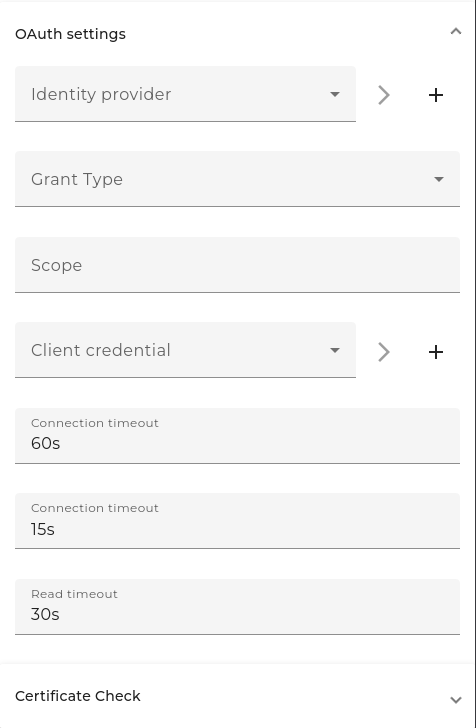
OAuth can be used for authentication. First, a Json Web Token (JWT) is requested from an identity provider and appended directly to the actual request. To use this feature, you must make the following configurations.
 |
|---|
| OAuth settings of the channel Orchestra Parameter Sender |
Currently, two different grant types are supported. Additional request parameters cannot be added to OAuth authentication at this time.
-
Grant Type
-
Password-Grant Is a way to exchange a user's credentials for an access token. The following information is required and added to the token request. Client- Identifier, Client-Secret, Username, Password, Identity Provider The Identity Provider is a URL to a token endpoint. The Client-Identifier and the Client-Secret are base64-encoded and added to the request header and body as authentication. The Username and the Passerword are added to the body. Currently the same user credentials are used, which are also used for username/password authentication.
-
Client Credentials Is used when applications request an access token to access their own resources, not on behalf of a user. Client Credentials (Header) send client-ID & client-Secret in the Request-Header. Client Credentials (Body) send client-ID & client- Secret in the Request-Body. The following information is required and added to the token request. Client- Identifier, Client-Secret, Identity Provider The Identity Provider is a URL to a token endpoint. The Client-Identifier and the Client-Secret are base64-encoded and added to the request header or body.
-
-
User-Credentials User with the same username and password as on the identity-provider. User type has to be a "Technical login".
-
Identity-Provider Is a URL to a token endpoint of the identity-provider (authorization server).
-
Client credential Is used to select user credentials with Client-Identifier and Client-Secret that is relevant.
-
Client-Identifier Is the identifier of the user at the identity provider. It is located at the Identity Provider and is set up in Credentials Username/Password as "Account name".
-
Client-Secret A secret generated by the identity provider. It is also located at the Identity Provider and is set up in Credentials Username/Password as "Password".
-
-
Certificate CheckS SL-Settings or Identity-Provider access. This can be used if the Identity-Provider has a SSL-Connection and the Certificate is a self signed X509-Certificate. For setting configuration use the certificate authentication as a reference.
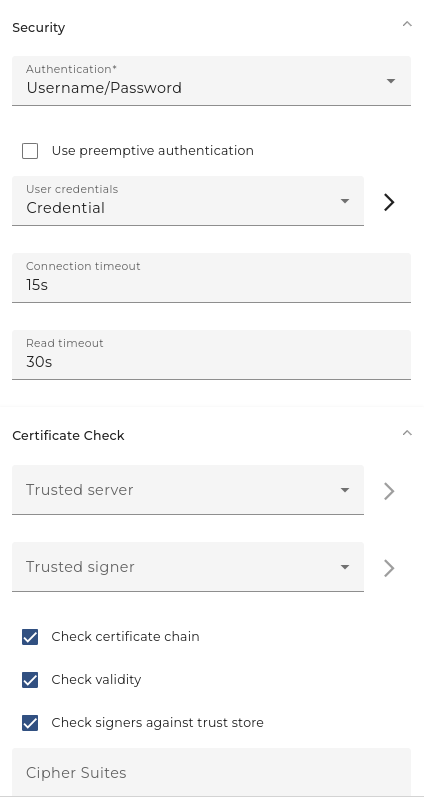
User-Credentials A user credential of type Technical login. If you work with No authorization required you need no selection here.
 |
|---|
| User/Password security settings of the channel Orchestra Parameter Sender |
The certificate Check Panel allows a user to configure the client side HTTPS connection details.
- User-Credentials (type=Technical login): The public/private keypair in pkcs#12 format which should be used for authorization.
- Trusted server (optional, type=Trusted server): This option allows to check the server's public key certificate which is presented by the server when the client makes a request.
- Trusted signer (optional, type=Trusted server): Checks whether the server's certificate has been signed by the given certificate and thus can be trusted.
- Check certificate chain (optional): check if the certificate chain is correctly signed (certificate n is signed by certfificate n + 1)
- Check validity (optional): If set, then check if the certificate is expired.
- Check signers against trust store: If set, then check that the one certificate in the certificate chain (typically the last one) is contained in the trust store.
- Cipher Suites (optional): Enforcing specific Cipher Suites to be used in TLS. The cipher suites are added as comma separated values in the text box(e.g. "TLS_ECDH_RSA_WITH_AES_256_CBC_SHA,TLS_ECDHE_RSA_WITH_AES_256_CBC_SHA,TLS_ DHE_RSA_WITH_AES_256_CBC_SHA").
Parameters
Define one or more parameters to be passed to the remote Orchestra
- the mapping of the parameters between outbound and inbound channel is done by name (order of the parameters is not important)
- the parameters must be set manually at outbound and inbound side (there is no export/import)
- the usage setting (INPUT, OUTPUT) is only used in request/response mode.
Parameters
| Parameter name | Direction | Description |
|---|---|---|
| ctrl_endpoint | Ingoing | This parameter is visible if Endpoint is selected. It is used to overwrite the target URL. |
| IDEMPOTENT | Ingoing | True indicates that Orchestra ensures idempotence. This is the default if not set. |
| DYNAMIC_SERVICE_URL | Ingoing | Service URL environment entry. |
| ALREADY_EXECUTED | Outgoing | Indicates that the request has already been processed. (in synchronous and idempotent mode) |
Additonally the channel has all the parameters defined in the parameter list.
Calling the channel
The sender can define if idempotent communication should be used or not by setting a parameter:
If the parameter IDEMPOTENT is set to false, this behavior is explicitly disabled. In this case every retry starts a new process instance on the remote Orchestra processing the data.
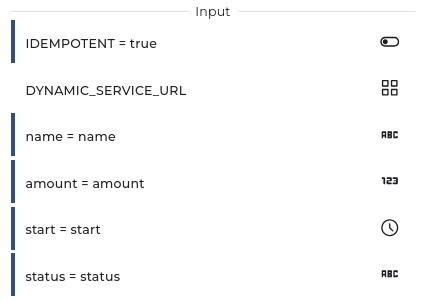
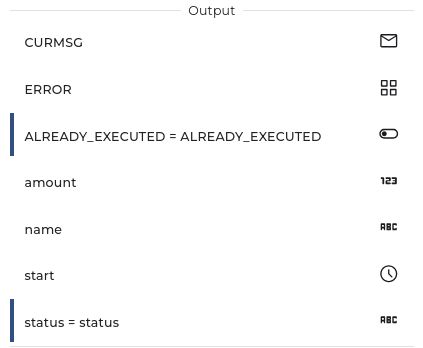
The channel returns a boolean value ALREADY_EXECUTED if the invocation was ignored because it was called repeatedly.
Testing
In the Scenario with the Parameter Receiver channel start the test engine, open the tab Channels, open the Properties of the Parameter Receiver and from there copy the URL. With this URL you can then configure the Service-URL.
See also
To receive Parameters sent by a Parameter Sender use the Parameter Receiver channel